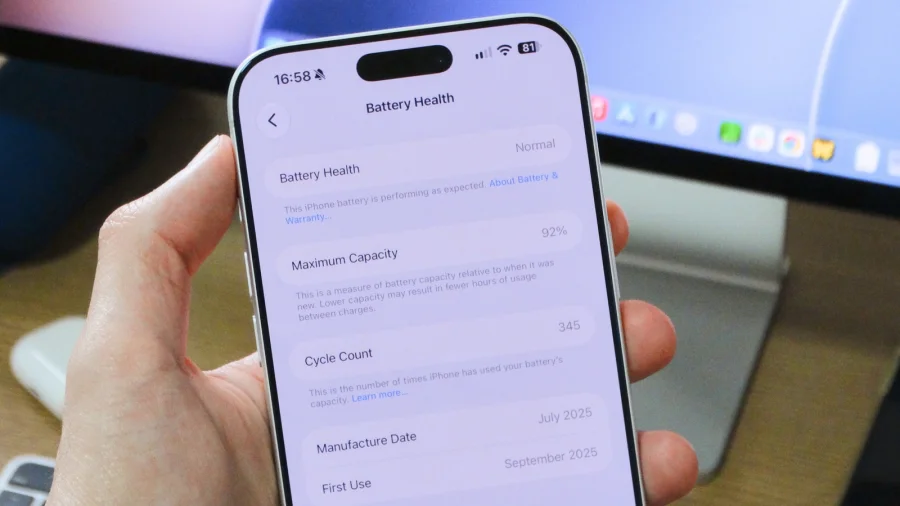

Your iPhone's battery doesn't last forever. Over time, it holds less charge and performs worse. Apple gives you a simple way to check battery health, but finding the cycle count takes a few extra steps. Here's how to do both.
How to check iPhone battery health in Settings
The easiest way to check your battery's condition is built right into iOS. Open the Settings app, tap Battery, then tap Battery Health. This screen shows you the maximum capacity of your battery compared to when it was new. A percentage of 100% means your battery is in top shape. As the number drops, your battery holds less charge.
According to Mr FIX Electronics, this built-in health percentage gives you a quick snapshot, but it doesn't tell you everything. To get the full picture, you need to check the cycle count — the number of times your battery has been fully drained and recharged.
How to find your iPhone battery cycle count
Apple hides the cycle count in your iPhone's analytics logs. To access it, you first need to turn on analytics sharing. Go to Settings, then Privacy & Security, then Analytics & Improvements. Make sure "Share iPhone Analytics" is turned on. If it's off, your phone won't save the data you need.
Once analytics are enabled, go back to Privacy & Security, tap Analytics & Improvements, then tap Analytics Data. You'll see a long list of files. Scroll down until you find the latest file that starts with "log-aggregated." Tap it, and you'll see a wall of text. You can search for "battery.cycle_count" to find the number you're looking for, as explained in a Reddit guide.
This process works, but it's tedious. That's why some people use shortcuts to automate it.
Using a shortcut to check battery cycle count
If you don't want to dig through log files every time, you can set up a shortcut. A Payette Forward guide shows how to create a shortcut that pulls the cycle count from your analytics data automatically. Once set up, running the shortcut gives you the number instantly.
Video guides also walk through this process step by step. One YouTube tutorial demonstrates how to check the real battery health of any iPhone using this method, including on iOS 26.
What your battery cycle count means
Understanding the numbers is just as important as finding them. Your battery cycle count tells you how many times your battery has used up its full capacity. For example, if you drain your phone from 100% to 0% and charge it back to 100%, that's one cycle. If you drain it from 100% to 50% twice, that also adds up to one cycle.
There's a simple formula to estimate how much capacity you've lost, according to a YouTube calculation guide. Take your cycle count, multiply it by 20, then divide by 500 for most iPhones, or by 1000 for newer models. The result tells you roughly how much battery capacity you've lost.
Another YouTube tutorial emphasizes that checking cycles gives you a more accurate picture of battery health than the percentage alone. A battery can show 90% health but have a high cycle count, meaning it's been used heavily.
Our Take: Check your battery before it fails you
To put it plainly, most iPhone users never check their battery cycle count. They rely only on the health percentage in Settings, which gives a partial story. The cycle count reveals how hard your battery has actually worked.
We think checking both numbers is worth the effort. If your cycle count is high — in the hundreds — your battery is aging, even if the health percentage looks fine. Knowing this helps you plan ahead. You can adjust your charging habits, or budget for a battery replacement before your phone dies unexpectedly.
The shortcut method is the smartest approach. It turns a complicated process into one tap. If you're not comfortable setting up shortcuts, the manual log method works just as well — it just takes a few extra minutes.
Either way, checking your battery health and cycle count is a simple habit that can save you from a dead phone at the worst possible moment.
Sources & References
- Mr FIX Electronics — Step-by-Step Guide to Checking Your iPhone's Battery Cycle Count
- Payette Forward — Shortcut: Check Your iPhone's Battery Cycle Count
- Reddit — TIL How to Check Battery Cycle Count on an iPhone
- YouTube — How to Check iPhone Battery Cycle Count on iOS 26
- YouTube — Battery Cycle Count Capacity Loss Calculation
- YouTube — How to Check Real iPhone Battery Health